Welcome!
This page goes into advanced detail all of the mechanics of the GildedGala game & web app.
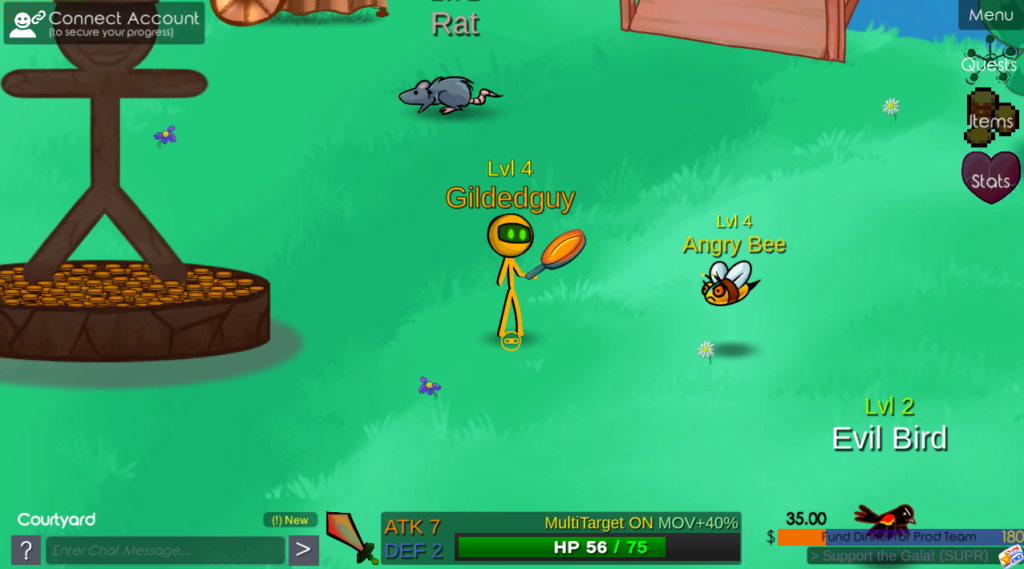
Getting Started
This game can be played for free in web browser, or as a downloaded app on Windows, iOS, or Linux platforms. (Download via the Itch.io Launcher to get automatic updates!)
Your progress is automatically saved when using both Guest and Signed-In profiles – but Guest accounts are especially at risk in between app updates. Thus, it is recommended to Download the app and Sign-In to avoid losing your character.
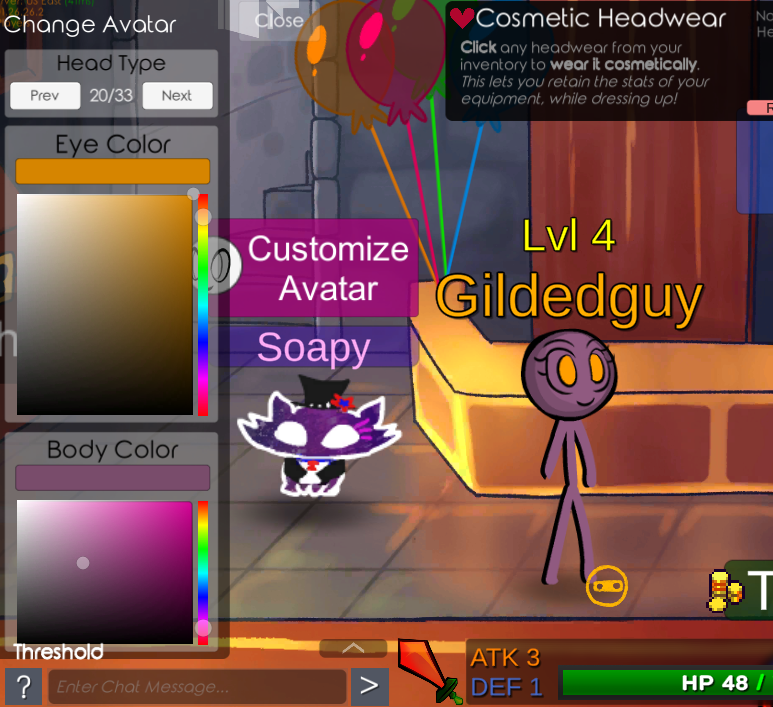
You can customize your avatar’s appearance in the Threshold (main lobby). You can also specify a piece of cosmetic headwear to wear on top of your equipped items.
Movement & Navigation
Click or use WASD to move around. There are door icons you can use to traverse areas of the game.

Combat System
Click the Sword Icon at the bottom the screen (or use Spacebar) to activate Attack Mode. Your cursor will turn into the Sword. Use your cursor to then click an Enemy to attack them! Your character will auto-attack on their own until you move away, or until someone falls in combat.
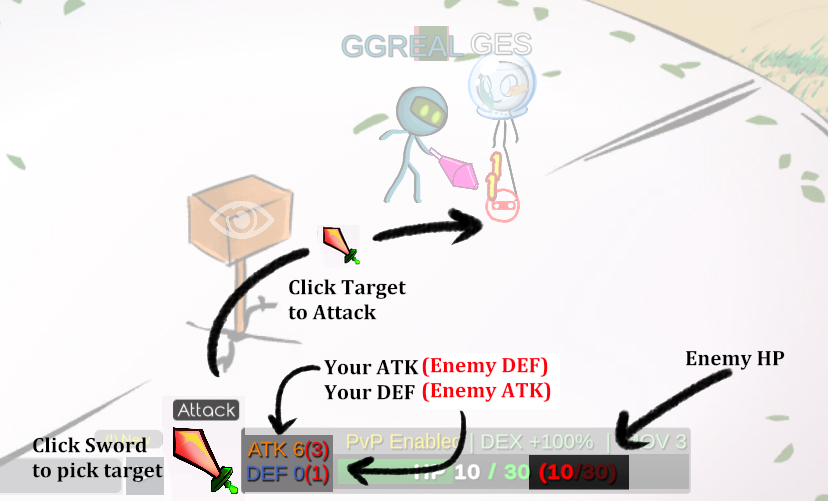
You can Right-click to cancel Attack Mode.
By default you may only target one enemy at a time. But some areas of the castle are multi-combat, which means you can surround (and get surrounded) by multiple targets, so watch out!
You must be disengaged from a fight for at least 5 seconds before being able to exit the room.
Character Stats
ATK represents the maximum base damage you can deal to an opponent (dice roll between 1 to ATK points of damage).
DEF is the the amount damage you will mitigate/cancel out from an attack.
DEX represents how often you can attack. (Base rate is 1 attack every 2 seconds).
MOV represents how fast you can move, which is important for escaping and spacing.
Items & Equipment
Use the Item button toggle to open your inventory of items. You can only carry so many items (18) before becoming Overburdened, which slows you down. Select an item in your inventory to see the available interaction options with that item.
You will lose nearly all items upon death. Your equipped items and certain permanent items will be preserved. So keep your HP up by eating food!
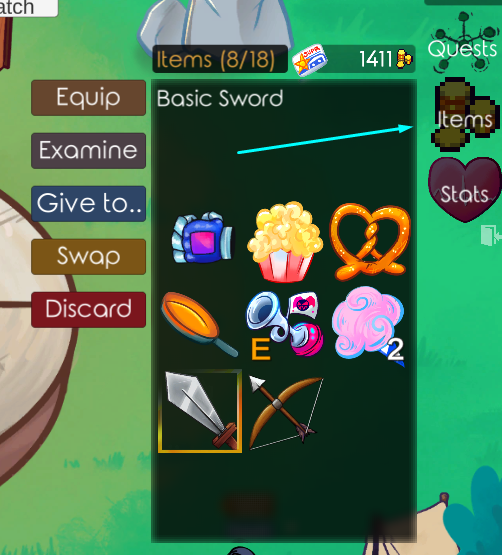
If you wish to protect more items, visit the Stash in the Threshold (main lobby). There you can bank your items safely.
Quests & Progression
Use the Quests button toggle to see all the quests. They’ll tell you how to initiate them, as well as track your progress.
The Stats button will show you your current level, and how close you are to reaching the next level. Leveling up will increase your inherent ATK and DEF. You can level up by earning XP from defeating monsters. XP gets watered down as you level up, so make sure you pick strong opponents!
Enemies will usually auto-attack any player within 2 levels of their own. Keep that in mind when walking near danger.
Trading & Economy
Gil is the main currency in Gilded’s Castle – it can be earned from quests, playing mini-games, defeating monsters, and selling items to the Trader. The trader doesn’t always have gold on him, so check back in with him often.
You can trade most items to other players by targeting them with the Trade button (similar to Attack Mode). There is currently no way to directly give Gil (gold) to other players.
Chat & Social Features

The Chat window in the bottom left will display important game info, as well as messages from other players. If you do not want to see others’ messages, switch to a different chat channel within the window.
You can report misconduct to our mods by visiting the Discord server.
Advanced Tips & Troubleshooting
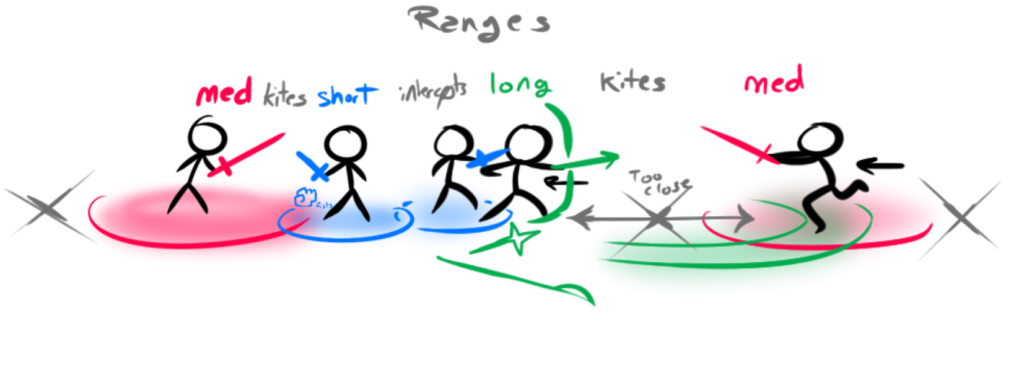
- There are now 3 core Weapon types, each with their own rock/paper/scissor style matchups:
- Close: Beats Far by closing in.
- Mid: Beats Close by out damaging.
- Far: Beats Mid by out ranging (kiting).
- If you are looking for excitement, you can enter the Dark Forest, where there is high-stakes PvP. You will automatically loot other Players you kill.
- The Dueling Arenas are safer areas to practice PvP with others. Consuming items is not allowed.
- No-Limits Duels allow any player, regardless of level to join the fight.
- Ranked Duels prioritize players will similar combat levels.

- The SUPR pass is an optional purchase for unlocking extra content. It helps me recover a portion of development costs, and helps me gauge interest in developing future the GildedGala into a bigger game.
A Note About Further Development
This has been a passion project of mine for over a decade. Although it brings me great delight to have players engage with my little multiplayer world, it has cost thousands of hours of coding, research, and debugging time. As such, I cannot continue maintaining the game as a long-term live service unless a financial partner (or another coder) gets involved.
If you see the potential in this game and want to offer financial or development partnership – I’m all ears! Please email me at michael@gildedguy.com
Thanks!
Got any of your own gameplay tips? Leave them as a comment below!
5 Comments
Jessica Poole · March 26, 2026 at 12:37 am
I am a fa
Diana · February 15, 2026 at 6:06 pm
Como e onde jogar?
Permabudhi NTB · July 2, 2026 at 12:02 am
Banguserwy
LikeNokia · January 31, 2026 at 9:34 pm
As a Junior Game Designer myself, this is amazing, this is such a cool idea/game that is implemented for the the timed releases of your Gildedguy episodes. You truly are so multitalented and an inspiration to a game dev/designer like me. Keep up the amazing work you always deliver such amazing high quality content.
-LikeNokia
Permabudhi NTB · April 25, 2026 at 8:52 pm
Cjso